Service 消息处理与 Handler
LLBC_Service 通过 opcode 路由表将收到的网络包分发给对应的处理函数(Handler)。
业务代码用 Subscribe 把一个成员函数或 delegate 绑定到某个 opcode,框架在网络包
到达并经过协议栈解码后,自动调用该函数并传入 LLBC_Packet &。
PreSubscribe 可在主处理函数之前插入前置过滤逻辑;AddCoderFactory 则让框架
按 opcode 自动实例化并调用 LLBC_Coder::Decode,处理函数直接取解码对象,无需手写
packet >> 散落代码。
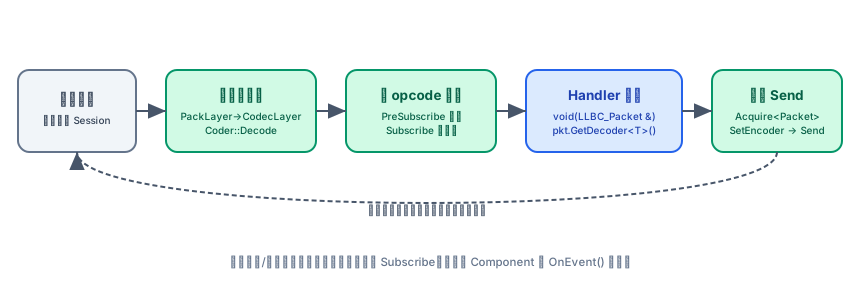
Subscribe:注册 opcode 处理函数
每个 opcode 只能绑定一个主处理函数。最常见形式是绑定到 Component 成员方法:
// 成员方法形式:Subscribe(opcode, obj, &Class::Method)
svc->Subscribe(1, comp, &MyComp::OnRecvData);

// delegate 形式(lambda、自由函数均可)
svc->Subscribe(2, LLBC_Delegate<void(LLBC_Packet &)>([](LLBC_Packet &pkt) {
    // ...
}));
处理函数签名固定为 void(LLBC_Packet &)。
从 Packet 读取数据
LLBC_Packet 提供 >> 运算符(内部调用 Read),按写入顺序逐字段消费 payload。
包头元数据(会话 ID、opcode、状态码)通过 getter 直接读取:
void MyComp::OnRecvData(LLBC_Packet &pkt)
{
    // 读取包头元数据
    int sessionId = pkt.GetSessionId();   // 来源会话 ID
    int opcode    = pkt.GetOpcode();      // opcode(与 Subscribe 注册的一致)
    int status    = pkt.GetStatus();      // 状态码,默认 0

    // 顺序读出 payload 字段
    uint64      playerId;
    LLBC_String playerName;
    int         level;
    pkt >> playerId >> playerName >> level;
}
>> 和 Read() 都沿读游标顺序消费,不能回退或随机定位。若注册了
AddCoderFactory,则框架在回调前已自动调用 Decode,直接用
GetDecoder<T>() 取对象即可,无需再手动 >>(见下一节)。
AddCoderFactory:自动编解码
将 LLBC_CoderFactory 与 opcode 绑定后,框架在收到该 opcode 的包时会自动
分配 LLBC_Coder 实例并调用 Decode;处理函数通过 GetDecoder<T>() 取出已
解码的业务对象:
// 定义 Coder
struct TestData final : public LLBC_Coder
{
    int         iVal;
    LLBC_String strVal;

    bool Encode(LLBC_Packet &pkt) override { pkt << iVal << strVal; return true; }
    bool Decode(LLBC_Packet &pkt) override { pkt >> iVal >> strVal; return true; }
};

// 定义工厂
struct TestDataFactory final : public LLBC_CoderFactory
{
    LLBC_Coder *Create() const override { return new TestData; }
};

// 注册(在 Start() 之前调用)
svc->AddCoderFactory(/*opcode=*/1, new TestDataFactory);
// 或模板形式,框架内部 new:
svc->AddCoderFactory<TestDataFactory>(/*opcode=*/1);
处理函数中直接取解码对象:
void MyComp::OnRecvData(LLBC_Packet &pkt)
{
    TestData *data = pkt.GetDecoder<TestData>();
    LLBC_PrintLn("iVal=%d strVal=%s", data->iVal, data->strVal.c_str());
}
LLBC_Coder 继承自 LLBC_PoolObj,框架在处理完毕后统一回收,业务代码无需 delete。
取回包并发送
在处理函数中构建应答包时,优先从 Service 的线程不安全对象池(Service 线程内)
或线程安全对象池(跨线程)获取 LLBC_Packet,避免频繁堆分配:
void MyComp::OnRecvData(LLBC_Packet &pkt)
{
    TestData *data = pkt.GetDecoder<TestData>();

    // 构造回包:复用收包 sessionId 和 opcode
    TestData *resData  = new TestData;
    resData->iVal  = data->iVal;
    resData->strVal = data->strVal;

    LLBC_Packet *res = GetService()->GetThreadSafeObjPool().Acquire<LLBC_Packet>();
    res->SetHeader(pkt.GetSessionId(), pkt.GetOpcode(), /*status=*/0);
    res->SetEncoder(resData);   // 框架 Send 时调用 Encode,之后自动 delete encoder

    GetService()->Send(res);    // 无论成功与否,res 所有权转移给框架
}
也可以直接通过便捷重载发送 Coder 或原始字节,无需手动构造 Packet:
// 以 Coder 发包(框架内部取 Packet 并调用 Encode)
svc->Send(sessionId, /*opcode=*/1, resData, /*status=*/0);

// 以原始字节发包
svc->Send(sessionId, /*opcode=*/2, buf, len);
使用默认 NormalProtocolFactory 发送原始字节、且该 opcode 未通过
AddCoderFactory 注册 Coder 时,必须在 Start() 前调用
svc->SuppressCoderNotFoundWarning()。否则 CodecProtocol 会丢弃收包,
Subscribe 的 Handler 不会被调用。若注册了 CoderFactory,则不需要抑制。
无论 Send 成功与否,LLBC_Packet * 和 LLBC_Coder * 的所有权在调用后
立即归框架管理;调用方绝不能在 Send 后再访问这两个指针。
PreSubscribe:前置过滤
PreSubscribe 在 Subscribe 主处理函数之前执行。返回 false 则中止后续处理流程
(主处理函数不会被调用):
// 注册前置过滤(与 Subscribe 同一 opcode)
svc->PreSubscribe(1, comp, &MyComp::OnPreRecvData);

// 实现:返回 false 可丢弃该包
bool MyComp::OnPreRecvData(LLBC_Packet &pkt)
{
    TestData *data = pkt.GetDecoder<TestData>();
    if (data->iVal < 0)
        return false;  // 非法数据,中止处理

    // 将预处理结果挂到 pkt,主处理函数通过 GetPreHandleResult<T>() 取用
    pkt.SetPreHandleResult(LLBC_Malloc(char, 64), [](void *p){ free(p); });
    return true;
}
若编译时开启了 LLBC_CFG_COMM_ENABLE_UNIFY_PRESUBSCRIBE,还可以调用
UnifyPreSubscribe 注册全局前置过滤,对所有 opcode 生效,签名相同:
bool(LLBC_Packet &)。
状态码处理
若编译时开启了 LLBC_CFG_COMM_ENABLE_STATUS_HANDLER,可为
(opcode, status) 组合注册单独的处理函数;注册后框架不再调用该 opcode
的默认主处理函数:
// 注册状态码处理函数
svc->SubscribeStatus(/*opcode=*/1, /*status=*/1, comp, &MyComp::OnStatus_1);

void MyComp::OnStatus_1(LLBC_Packet &pkt)
{
    LLBC_PrintLn("opcode=%d status=%d", pkt.GetOpcode(), pkt.GetStatus());
}
会话事件通知
会话建立 / 断开等非消息事件不走 Subscribe 路由,而是通过 LLBC_Component::OnEvent
回调分发。组件内部按 eventType 分支处理:
void MyComp::OnEvent(int eventType, const LLBC_Variant &eventParams) override
{
    switch (eventType)
    {
        case LLBC_ComponentEventType::SessionCreate:
        {
            auto *info = eventParams.As<LLBC_SessionInfo *>();
            LLBC_PrintLn("Session created: %s", info->ToString().c_str());
            break;
        }
        case LLBC_ComponentEventType::SessionDestroy:
        {
            auto *info = eventParams.As<LLBC_SessionDestroyInfo *>();
            LLBC_PrintLn("Session destroyed: %s", info->ToString().c_str());
            break;
        }
        default:
            break;
    }
}
业务逻辑也可以用 AddComponentEvent 向组件投递自定义事件:
// eventType 值从 LLBC_ComponentEventType::LogicBegin 开始定义
GetService()->AddComponentEvent(MyCompEv1, LLBC_Variant("hello"));
详细事件类型定义参见 组件生命周期与事件。
参照
- 头文件:
llbc/include/llbc/comm/Service.h/ServiceInl.h - 头文件:
llbc/include/llbc/comm/Packet.h/PacketInl.h - 头文件:
llbc/include/llbc/comm/Coder.h - 功能测试(完整收发 + PreSubscribe + CoderFactory 示例):
tests/func_test/comm/FuncTest_Comm_SvcBase.cpp - 快速上手示例(可跑):
tests/example/comm/Example_Comm_ServiceMessaging.cpp
下一步
- Packet 编解码细节:Packet 与 Coder 编解码
- 二进制序列化:序列化 Stream
- 组件生命周期与事件:组件生命周期与事件
- Service 与 Component 概念:Service 与 Component